
Customer Self-Service
Customer Portal
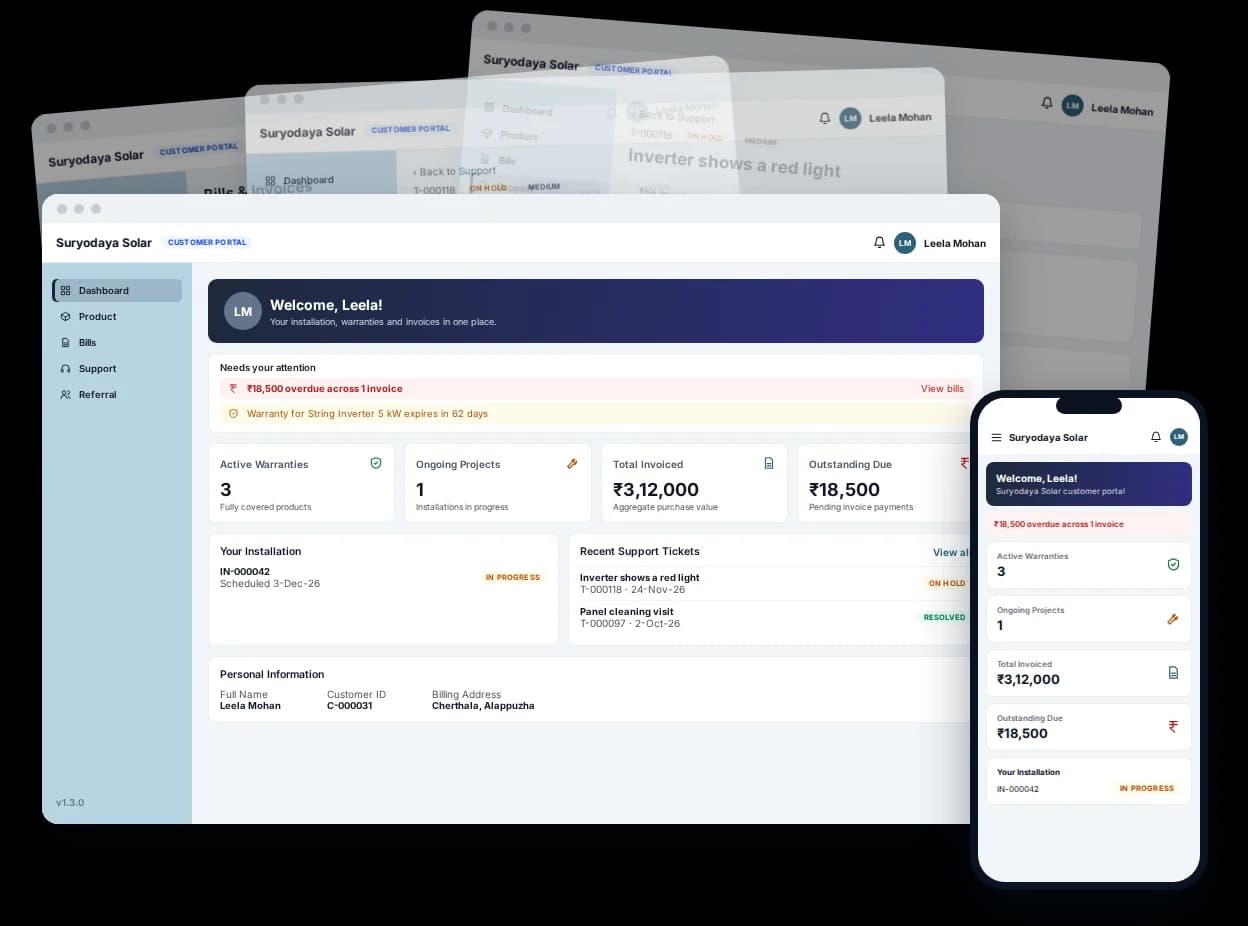
Give customers their own login to see their installation, invoices, payments and warranties, and to raise a ticket with photos or a voice note when something is wrong.
Free 30-minute walkthrough · reply within 1 working day
01Key capabilities
What it does.
- 01Customer signs in
- 02Checks the installation, invoices or warranty
- 03Raises a ticket when something is wrong
- 04Reads replies and rates the service
At a glance
- Tickets and feedback
- Products, warranty and bills
- Installation progress
- Message preferences
- 01
Raise a ticket with up to five photos and a voice note.
- 02
Read your team’s public replies, reply on an open ticket and reopen one that is not fixed.
- 03
Star rating from 1 to 5 and feedback once a ticket is resolved.
- 04
See invoices with due dates and balances, and download the invoice PDF.
- 05
See payment history.
- 06
Check installed products, serial numbers and warranty expiry dates.
- 07
Follow an ongoing installation: its stage and scheduled date.
- 08
Maintenance contracts alongside tickets.
- 09
A referral section.
- 10
Update billing and shipping addresses.
- 11
Customers choose their promotional message channels, or pause them all.
- 12
A login is created when you mark a new customer’s deal Won, if they have an email address.
- 13
Separately, a secure upload link collects documents from a customer without any login (one-time codes and public sharing must be switched on).
02The problem
Customers have to call to ask.
Where is my invoice? Is the inverter still under warranty? When is the visit? Each question is a phone call that someone has to stop and answer.
The portal puts those answers in front of the customer, on a computer or a phone.
03A day with it
From the customer’s side.
- Customer
Signs in and sees what needs attention: an overdue invoice or a warranty about to expire.
- Customer
Opens the installation card to check the stage and the date.
- Customer
Reports a fault with a voice note and two photos.
- Your team
Receives the ticket in evo7 along with the photos and the voice note.
- Customer
Rates the support once the ticket is resolved.
04Who uses it
Who sees what.
Customer
Sees only their own installation, bills, products and tickets.
Your support team
Works the tickets that customers raise.
Your accounts team
Issues the invoices that appear in the portal.
How does a customer get a login?
When a deal is won for a new customer who has an email address, evo7 creates the account. A customer you add by hand with an email address gets one too.
Can customers see internal notes?
No. They see your team’s public replies, and internal notes stay hidden.
Can customers see their warranty?
Yes. The portal shows their installed products and warranty status.
Does a customer need a login to send documents?
No. A document request link works with a one-time code and no account.
Does it work on a phone?
Yes. It runs in the phone’s browser, with the menu in a side drawer.
See it running on your own operations
A 30-minute walkthrough. Bring a recent quote, your stock sheet or a job that is stuck.
Free 30-minute walkthrough · reply within 1 working day